
EOS - LASER CALCULATORS
EOS Dynamics Engineering Tools
Laser Calculators
Rectangular Laser Beam Propagation & Remaining Power Calculator
Estimate rectangular laser beam width, height, spot area, atmospheric transmission, remaining optical power and irradiance at a selected distance.
Engineering screening tool:
This calculator is especially useful for diode bar, laser array, beam-shaped and rectangular output systems where horizontal and vertical divergence are different. It uses a simplified atmospheric attenuation model and does not replace measured propagation or MODTRAN/LOWTRAN analysis.
Laser Source
Beam Divergence
Beam growth is calculated separately for X and Y axes:
width = initial width + divergence × range.
Atmosphere / Scattering
Use manual β if you already have measured atmospheric extinction data.
Result will appear here.
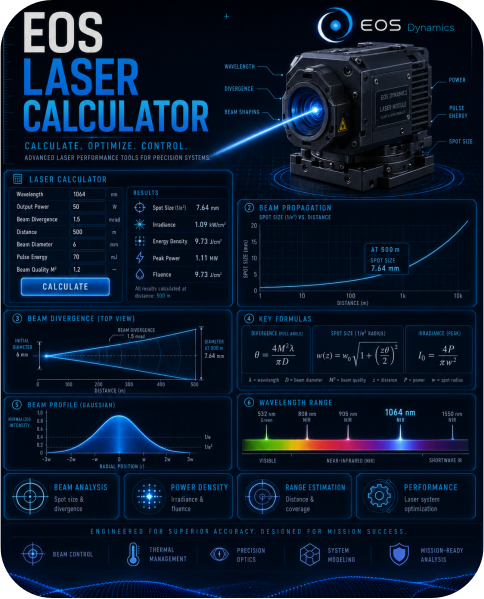
Laser Beam Footprint, Irradiance & Fluence Calculator
Estimate laser spot diameter, beam area, CW irradiance, pulse fluence and peak irradiance at a selected range.
Engineering screening tool:
This calculator assumes full-angle divergence and circular beam footprint. Real beam profiles may differ depending on Gaussian shape, rectangular diode output, beam quality, clipping, optics and alignment.
Beam Geometry
CW / Average Power
For CW lasers, use optical output power. For pulsed lasers, use average optical power
if you want average irradiance.
Pulsed Laser
Pulse fluence uses pulse energy. Peak irradiance uses pulse energy divided by pulse width.
Result will appear here.
Pulse Energy, Peak Power & Duty Cycle Calculator
Calculate peak power, average power, duty cycle and estimated electrical input power for pulsed lasers.
Pulse Parameters
Efficiency / Thermal
Efficiency is used to estimate electrical input power and heat load.
Use Case
Result will appear here.
Beam Expander & Divergence Calculator
Estimate output beam diameter, reduced divergence, spot size at range and transmitted optical power after a beam expander.
Input Beam
Beam Expander
Range
Ideal beam expander approximation: output beam diameter increases by magnification,
divergence decreases by magnification.
Result will appear here.
NOHD Screening Calculator
Estimate nominal ocular hazard distance using user-provided MPE value, beam diameter, divergence and optical output power or pulse energy.
Laser safety warning:
This calculator does not determine laser class and does not calculate official MPE. Enter MPE only if it is already known from the applicable standard, safety officer, product report or verified laser safety calculation.
Mode
CW Input
Pulsed Input
Use CW mode for W/cm² MPE. Use pulsed mode for J/cm² MPE.
Result will appear here.
Laser Class Screening & Eyewear OD Assistant
Estimate preliminary laser hazard class screening and required laser safety eyewear optical density using wavelength, output power or pulse energy, beam geometry and user-provided MPE values.
Laser safety warning:
This tool does not provide official IEC 60825-1 or ANSI Z136 laser classification. Official laser classification and eyewear selection must be performed by a qualified laser safety officer or competent person using the applicable standard, product configuration and verified exposure limits.
Laser Source
Pulse / Beam Geometry
MPE / Eyewear
The calculator does not generate MPE automatically. Enter MPE from IEC/ANSI tables,
laser safety report, product safety file or verified laser safety calculation.
Result will appear here.
M² Beam Quality & Diffraction-Limited Divergence Calculator
Estimate diffraction-limited divergence, real divergence with M² beam quality, beam footprint at range and beam quality severity for circular, elliptical or rectangular laser beams.
Engineering screening tool:
This calculator uses Gaussian beam first-order relations. It assumes beam diameter is given as 1/e² intensity diameter. For diode bars, rectangular beams and shaped beams, use X and Y axes separately.
Laser / Beam Input
Beam Quality
Optional Beam Expander
Use 1 if there is no beam expander. For cylindrical beam shaping, X and Y magnification
can be different.
Result will appear here.
Laser-Induced Damage Threshold / LIDT Calculator
Estimate optical fluence, peak irradiance, average irradiance and safety margin against laser-induced damage threshold for lenses, windows, coatings, filters and beam shaping optics.
Engineering screening tool:
LIDT depends on wavelength, pulse duration, beam size, coating, substrate, repetition rate, contamination, thermal load and test method. This calculator is for preliminary screening only.
Laser Pulse / Power
Beam Footprint on Optic
Optic / Coating Limits
Result will appear here.
Laser Thermal Load & Cooling Calculator
Estimate electrical input power, optical output power, waste heat load, temperature rise and cooling risk for CW or pulsed laser modules.
Engineering screening tool:
Laser thermal performance depends on diode efficiency, duty cycle, heat sink design, thermal interface material, ambient temperature, airflow, mounting surface and operating duration. This calculator gives a first-order thermal screening result.
Laser Power
Thermal Path
Operation
Margin accounts for imperfect mounting, thermal paste, contact resistance, dust,
airflow loss and real-world integration effects.
Result will appear here.
Laser Illuminator Coverage & Target Irradiance Calculator
Estimate illuminated target width, height, spot area, atmospheric power loss and target irradiance for laser illuminators, IR pointers, diode arrays and beam-shaped laser modules.
Engineering screening tool:
This calculator is intended for preliminary laser illumination analysis. It is especially useful for rectangular or asymmetric beams where horizontal and vertical divergence must be evaluated separately. Real performance depends on beam profile, target reflectance, atmosphere, optics, alignment and sensor response.
Laser Source
Beam / Range
Target / Atmosphere
Target size is optional. If entered, the calculator checks whether the illuminated beam footprint
is too narrow, balanced or too wide for the target.
Result will appear here.